Airgap Workflow
What are Disconnected and Airgapped Environments?
Disconnected and airgapped environments are isolated from external networks, usually including the internet, to protect sensitive systems and data from unauthorized access or transfer. Artifacts cannot be pulled directly from where they are published, so every image, chart, and file has to be brought in deliberately. Most disconnected and airgapped environments fall into one of three categories.
| Category | Definition | Industries | How Hauler Helps |
|---|---|---|---|
| Fully Isolated | No network path to the outside | Classified government and military networks, critical infrastructure, and secure research facilities | Bundles everything into a single haul that is easy to review, approve, and carry in |
| Restricted Connectivity | Internal network, but no internet access | Regulated industries, finance, healthcare, sovereign clouds, and enterprise networks | Seeds your existing registries, or serves its own registry and fileserver to bootstrap them |
| Intermittent and Limited Connectivity | Occasional, slow, denied, or unreliable connections, known as DDIL | Ships and aircraft, remote and field locations, edge sites, and tactical deployments | Splits hauls into chunks for each connection window and serves them locally between connections |
Challenges and How Hauler Helps
| Challenge | How Hauler Helps |
|---|---|
| Data Transfers - moving artifacts in requires physical media, trusted intermediaries, and approvals | Hauler packages everything into a single haul, which can be split into chunks to fit your transfer media |
| Trust and Integrity - confirming that what arrived is exactly what was intended | Signatures, attestations, and SBOMs travel with each artifact, and the store can be validated after it arrives |
| Maintenance Complexity - updates and dependencies require careful planning every release | Declarative manifests rebuild the same store reliably for every release |
| Custom Tooling - delivery often depends on custom scripts and ad hoc processes | One binary with a built-in registry and fileserver handles the entire workflow |
Workflow
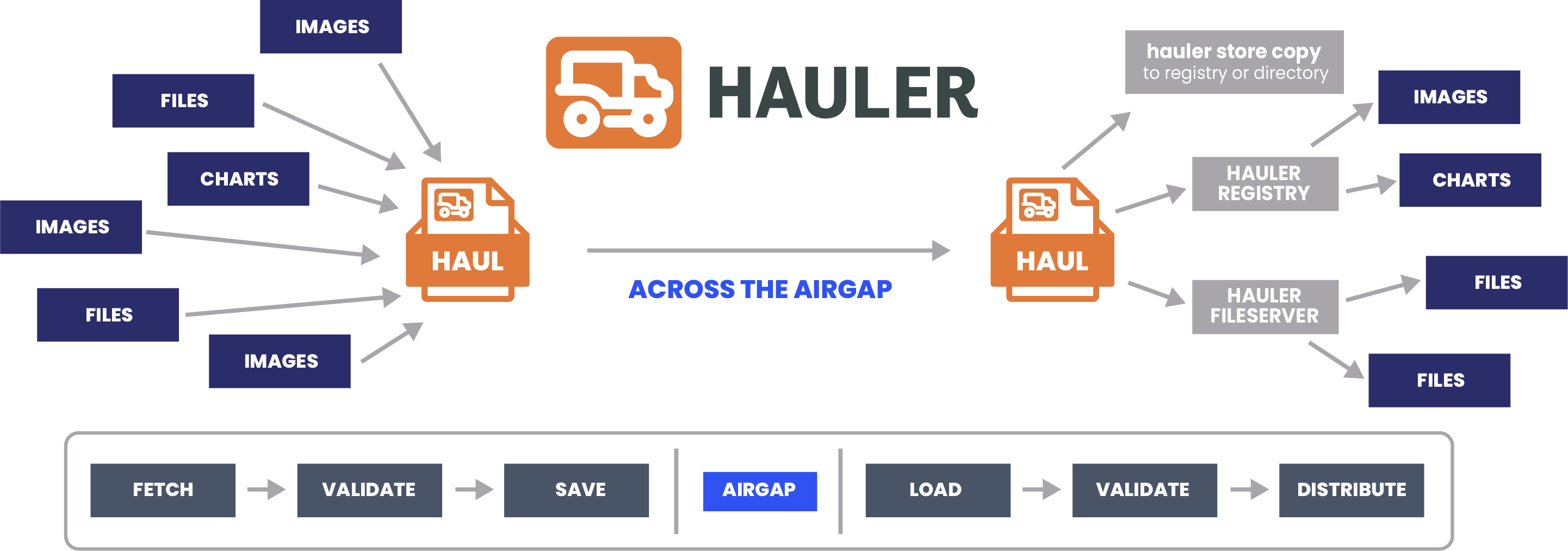
The Hauler workflow follows your artifacts through each step, from the connected side, into disconnected and airgapped environments, and out to where they are needed.
Connected Side
Fetch
Artifacts are added to the store from registries, helm repositories, and urls, either one at a time with hauler store add or declaratively with manifests and hauler store sync.
Validate
Image signatures are verified with cosign as artifacts are added, when a public key or keyless identity is provided, before anything is saved to the store, and hauler store info --check confirms every artifact in the store is complete.
Save
hauler store save packages the store into a haul, a single compressed archive ready to be transferred.
Airgap
The haul is transferred into disconnected and airgapped environments by whatever means your environment allows, such as physical media or a one-way transfer.
Disconnected and Airgapped Side
Load
hauler store load unpacks one or more hauls back into a store.
Validate
hauler store info --check confirms that every artifact arrived complete, and because signatures and attestations travel with each image, they can be verified again with cosign.
Distribute
The content is served with hauler store serve registry and hauler store serve fileserver, or copied into an existing registry or directory with hauler store copy.
Next Steps
- Learn how the pieces fit together in the Core Concepts.
- Walk through the workflow hands-on in the Quickstart.