Core Concepts
Hauler is built around a small set of concepts that follow your artifacts from where they are published to where they are needed in disconnected and airgapped environments. Understanding how they fit together makes the rest of these docs easier to follow:
- Content is the artifacts you want to move, such as images, charts, and files.
- Stores are where Hauler keeps that content locally as OCI artifacts.
- Manifests and Collections declare which content belongs in a store.
- Hauls are portable archives of a store that you carry into disconnected and airgapped environments.
- Distribution is how that content is served or copied once it arrives.
- Verification is how you confirm that content is exactly what was published.
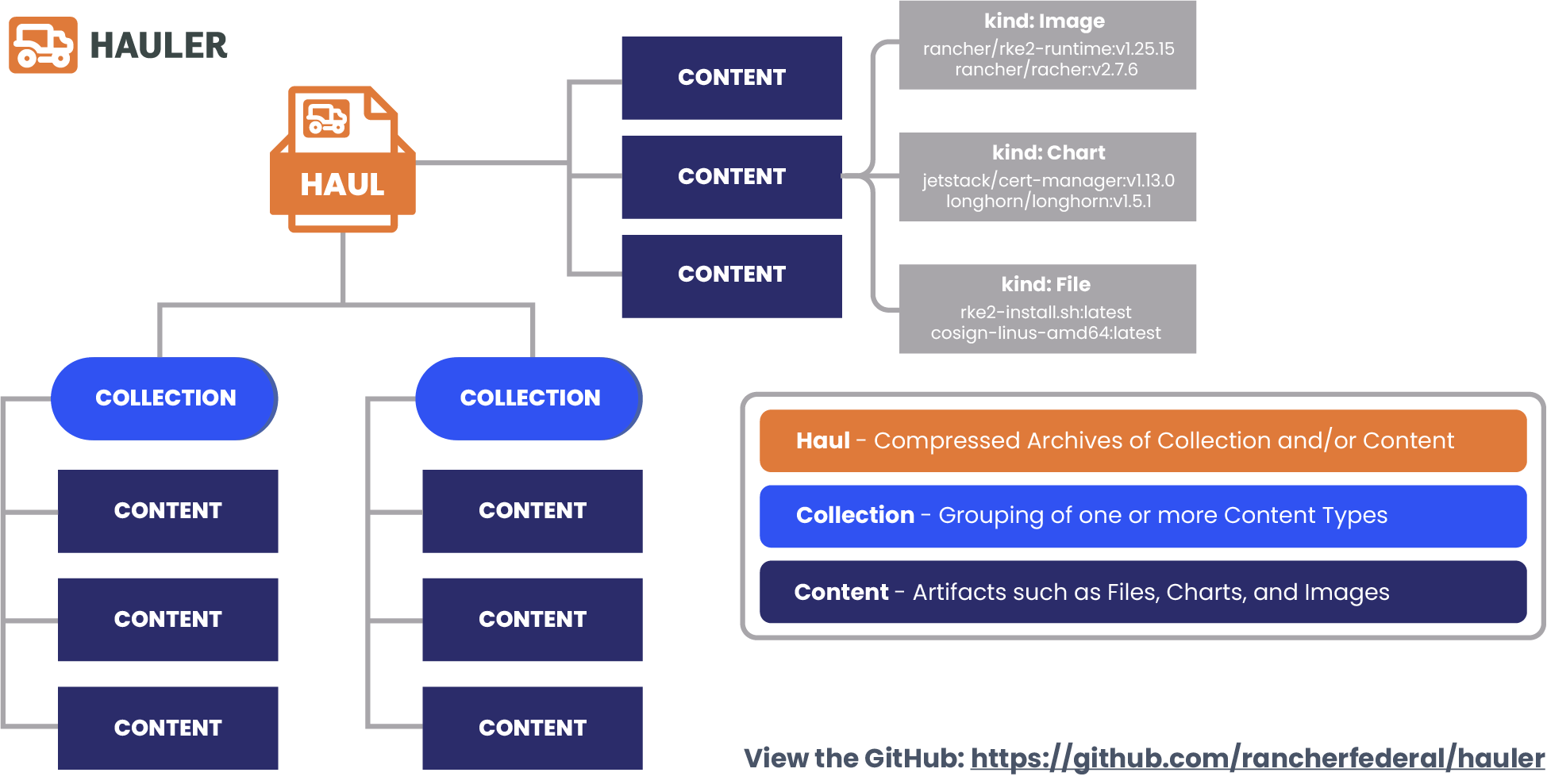
Content
Content is the artifacts Hauler moves, such as images, charts, and files, along with their supporting artifacts.
In Hauler's terminology, content refers to the artifacts you want to deliver: container images, helm charts, and files. Every piece of content is stored as an OCI (Open Container Initiative) artifact, which gives Hauler a single, standardized way to store, inspect, and move any type of artifact.
Images also bring their supporting artifacts with them, such as signatures, attestations, SBOMs, and OCI referrers. These travel with the image into disconnected and airgapped environments, so its supply chain information is never left behind.
See Hauler Content for details on each content type.
Store
The Store is the local OCI layout where Hauler keeps all of your content.
Every hauler store command works against a store, which is a directory on disk (store by default) organized as an OCI layout. Content is added to the store, inspected in the store, packaged from the store, and served from the store.
Each store has a unique store ID and keeps an audit log of the changes made to it, and hauler store info --check validates every artifact in the store to confirm nothing is missing or corrupted.
Manifests and Collections
Manifests declare content in a file, and Collections group content that represents a desired end result.
Content can be added one artifact at a time from the command line, but Hauler also supports a declarative approach with manifests. A manifest is a YAML file that lists the images (kind: Images), charts (kind: Charts), and files (kind: Files) you want, so the same store can be rebuilt reliably for every release with hauler store sync. Manifests can be kept locally or fetched from a remote url.
A collection is a group of content that together represents a desired end result, such as every image, chart, and file needed to stand up an application. Operators can define their own collections with manifests, and RGS Supported Customers can sync collections for the Rancher products directly from the RGS Carbide Registry.
See Hauler Manifests and Hauler Collections for more details.
Haul
A Haul is a compressed archive of a store that you carry into disconnected and airgapped environments.
hauler store save packages a store into a haul, a single compressed archive (haul.tar.zst by default). The haul is the unit you actually transfer, by whatever means your environment allows, such as physical media or a one-way transfer. On the other side, hauler store load unpacks one or more hauls back into a store.
Hauls can be split into chunks to fit your transfer media, limited to a specific platform, and saved in a format that containerd can import directly.
Distribution
Hauler serves or copies content once it reaches disconnected and airgapped environments.
Once a haul is loaded, Hauler can distribute its content in a few ways:
hauler store serve registryserves images and charts through an embedded OCI registry.hauler store serve fileserverserves files through an embedded fileserver.hauler store copyseeds an existing registry or a directory with the content of the store.hauler store extractwrites individual artifacts back out to disk.
Verification
Hauler can verify image signatures with cosign before content is saved to the store.
Hauler uses cosign to verify image signatures as content is added to the store, whenever a public key (--key) or a keyless identity (the certificate identity and OIDC issuer flags) is provided. Each image is resolved to a digest once, and that exact digest is verified and stored, so what you verified is exactly what you stored.
Because signatures and attestations travel with the image, teams on the disconnected and airgapped side can verify the same artifacts again with cosign once they are served or copied into a registry.
See Hauler Manifests for verification examples.